TL;DR
The pillar architecture guide: pool + RLS as the default, bridge for enterprise, async patterns that pay back fast, and the scaling roadmap from 500 to 50K users. 6,800+ words from a team that's shipped 5 SaaS builds 2023-2026.
TL;DR: SaaS architecture for a 2026 startup is five decisions: pool tenancy on Postgres with Row-Level Security, API-first contracts, a managed auth provider (Clerk, Auth0, or WorkOS), async job queues from week one, and a bridge plan before the first enterprise contract forces it. We have shipped 80+ products since 2019, including 5 SaaS builds across B2B analytics, fintech, healthcare, marketplace, and internal-ops. The global SaaS market hits $375 billion in 2026 (Fortune Business Insights).
You closed your seed round. Your investors want a working product in 90 days. Hiring a full engineering team will eat half your runway before anyone writes a line of code. You cannot afford to spend six months building infrastructure and then watch it buckle the day you sign your first enterprise customer.
This is the scenario we see every month. A founder ships fast, skips the architecture fundamentals, and then spends $30,000 to $40,000 rebuilding their data layer when a paying customer asks "How is my data isolated from other tenants?". The architecture decisions you make before writing your first line of code are the most expensive ones to change later.
SaaS architecture is the structural design of a software-as-a-service application. How it stores data for multiple customers, how those customers authenticate, how the API layer talks between frontend and backend, and how the system scales under load. Get these patterns right early and the product grows with you. Get them wrong and you have a rewrite project at 1,000 users.
MarsDevs is a product engineering company that builds SaaS platforms, AI-powered applications, and MVPs for startup founders. Founded in 2019, we have shipped 80+ products across 12 countries, and SaaS platforms account for roughly a third of that portfolio. This guide covers the architecture patterns we use on every SaaS project, based on what has worked (and what has failed) in production.
The five decisions that matter most:
Everything else is downstream of those five. The rest of this guide is the playbook we follow on every build.
Multi-tenancy is the most consequential architectural decision in SaaS. It decides how your application serves multiple customers from shared infrastructure while keeping each customer's data private and isolated. The AWS SaaS Lens names three canonical models: silo, pool, and bridge (AWS SaaS Lens). Pick one with intent.
Think of it this way. Single-tenant (silo) gives every customer their own copy of the application. One building per tenant. It works, but costs scale linearly and you manage separate properties for every customer. Multi-tenant (pool) shares infrastructure and isolates the data. One building, separate apartments, locks on every door. The bridge model runs both at once: pool for SMB, silo for enterprise.
The question is not whether to go multi-tenant. You should. The question is which isolation model wins for your stage and which one your second year of revenue will force you into.
| Pattern | How it works | Isolation level | Cost per tenant | Best for |
|---|---|---|---|---|
| Shared database, shared schema (pool) | All tenants in one Postgres database. A tenant_id column on every table. Row-Level Security enforces isolation. | Application + DB level | Lowest. Flat fixed cost. | Early-stage SaaS, B2C products, price-sensitive markets |
| Shared database, separate schemas | One database server, but each tenant gets a separate Postgres schema (namespace). | Database level | Moderate | Mid-market B2B SaaS with moderate compliance needs and a small tenant count |
| Database per tenant (silo) | Each tenant gets a dedicated Postgres instance. Complete infrastructure isolation. | Infrastructure level | Highest. Linear with tenant count. | Enterprise SaaS, regulated industries (HIPAA, PCI Level 1, sovereign residency) |
| Bridge (hybrid) | Pool for standard customers, silo for enterprise. Same control plane. Two data planes. | Tiered. Logical for standard, physical for enterprise. | Mixed. Pool flat. Silo priced into enterprise plan. | SaaS with both SMB and enterprise customers, year 2 onward |
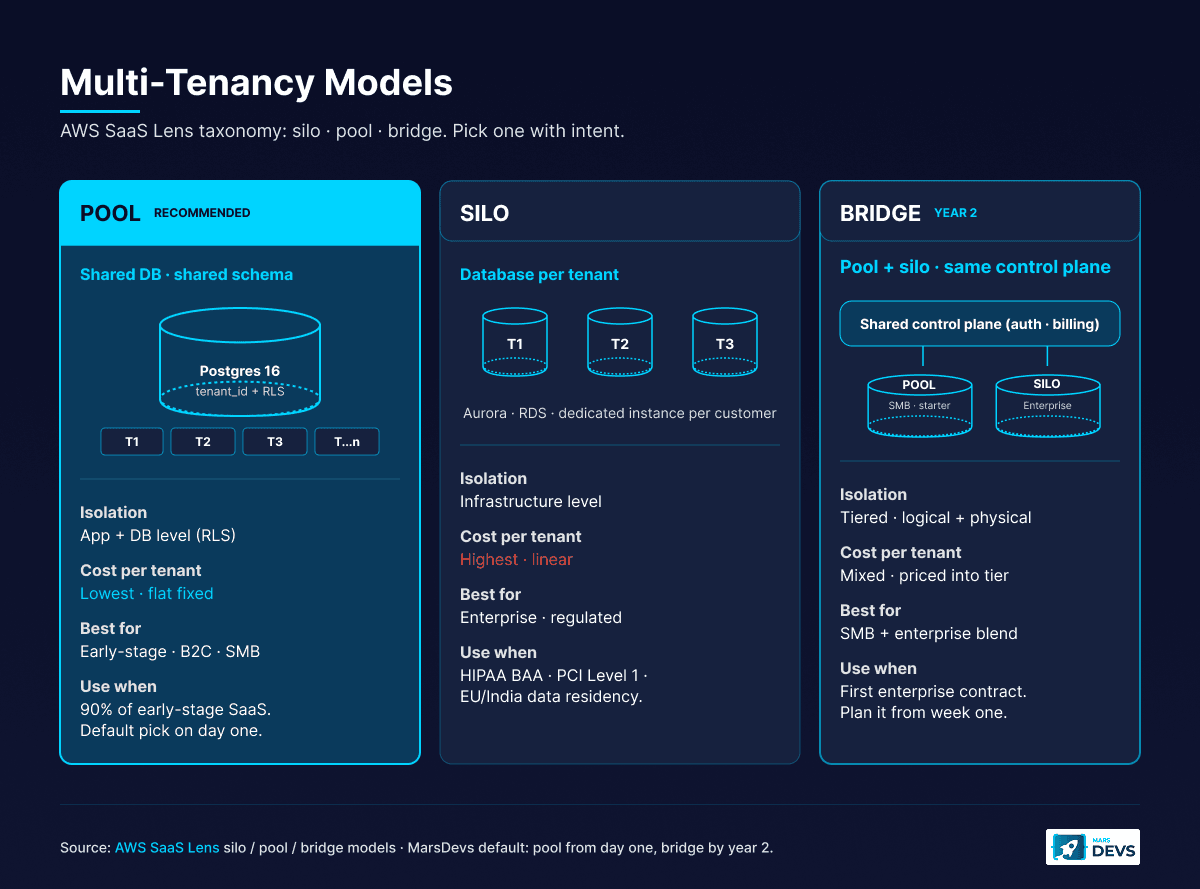
The short answer: shared database, shared schema (pool) for 90% of early-stage SaaS products.
Here is why. You add a tenant_id column to every table. Postgres Row-Level Security policies enforce isolation at the database, meaning even a bug in your application code cannot expose Tenant A's data to Tenant B. You run one set of migrations, one backup schedule, one monitoring dashboard. Operational overhead stays flat as you add customers. Adding tenant 1,000 costs near zero, because fixed cost (one DB primary, one app cluster, one observability stack) amortizes across every paying customer.
The separate-schemas approach sounds like a middle ground. It mostly is not. You still share a database server (so you do not get true infrastructure isolation), but you now manage N schemas for N tenants. Every migration runs N times. With 50 tenants, fine. With 500, a 30-second ALTER TABLE becomes a four-hour deploy. Schema sprawl becomes a real problem at 200+ tenants. We default to schema-per-tenant only when the customer base is going to stay under a few hundred and tenant data export (GDPR right-to-erasure) is a hot requirement.
Database per tenant is the right choice when regulatory or contract requirements demand it (HIPAA BAA per environment, PCI Level 1, EU/India/Australia data residency) or when your largest customers generate enough load to justify dedicated infrastructure. Offer it as an enterprise add-on at three to five times your standard price, not as the default. We have seen pre-seed founders burn $4K to $8K a month on idle silo infrastructure for 30 trial customers, none of whom needed isolation that strong. That is runway lit on fire.
The bridge model is the architecture most SaaS startups end up running by year two, even when they started pure pool. It is the only way to capture both SMB and enterprise without rebuilding from scratch.
In practice: free, starter, and growth plans live on a pooled Postgres with RLS. Enterprise plans provision a dedicated database (and sometimes a dedicated app cluster) per customer, billed at a higher tier that covers the cost. The control plane (auth, billing, tenant routing) is shared. The data plane splits between pool and silo based on plan.
The risk in bridge is operational. You now run two architectures in parallel, and the temptation is to special-case enterprise tenants in your application code. Resist that. Same code path, same schema, different tenant routing layer. The control plane reads the tenant's plan from a metadata table and resolves their database connection string at request time. From the application's perspective, every tenant looks identical. Only the connection pool knows there are two tiers underneath.
One rule we enforce on every SaaS project: build tenant isolation from day one. We have seen founders push this to "later" and then spend $30,000 fixing data leaks when they sign their first enterprise deal. Two to three days of upfront work saves months of pain.
For the full breakdown of when single-tenant earns its cost, read our multi-tenant vs single-tenant SaaS decision guide. For the architecture vs. service-extraction question, see our microservices vs monolith guide for startups.
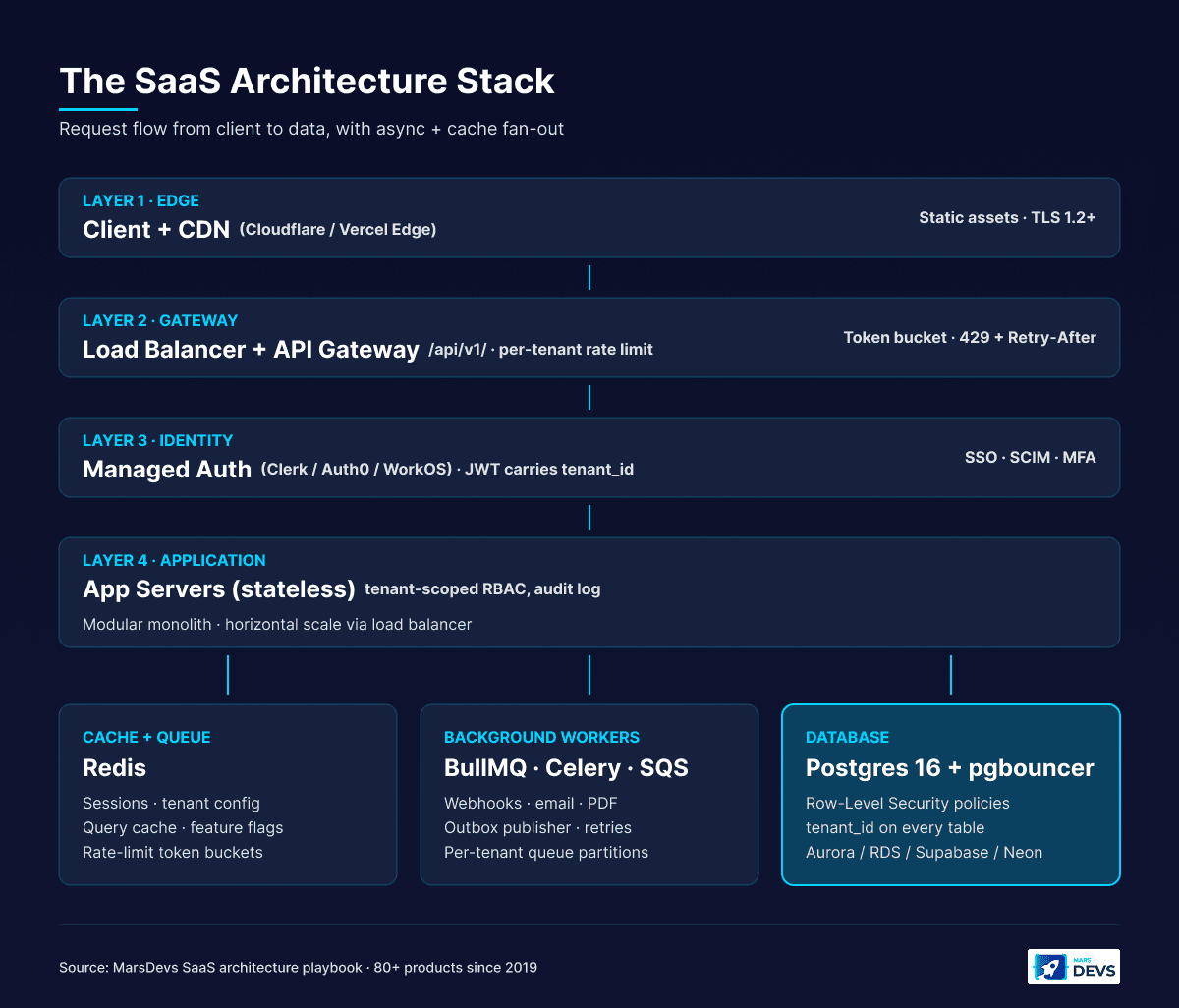
Your database is the foundation. The wrong choice creates performance bottlenecks, scaling headaches, and isolation risks that compound monthly. In 2026, the right default for SaaS is Postgres 16 on a managed service, with Row-Level Security on every multi-tenant table and pgbouncer in transaction-pooling mode in front of it.
Postgres handles relational integrity, JSONB for semi-structured data, RLS for multi-tenancy, full-text search, and pgvector for AI features. All in a single engine. You do not need MongoDB for flexible schemas (JSONB covers that). You do not need a separate search engine until you cross millions of records. And if you plan to add AI features in the next 12 months, pgvector means you do not need a separate vector database for embeddings.
Use Postgres through a managed service: Supabase, Neon, AWS RDS, or Aurora Serverless v2. The managed service handles backups, point-in-time recovery, connection pooling, and high availability. Your engineering time goes to building features, not babysitting database infrastructure. We have run a SaaS to $1M+ ARR on a single Postgres instance with proper indexing and connection pooling. The ceiling is contractual, not technical.
The four flavors we pick between, by use case:
Every table in a multi-tenant SaaS needs a tenant_id column. No exceptions. Here is what a battle-tested multi-tenant schema looks like:
tenant_id. One user can belong to multiple tenants if you support organization switching (Clerk and WorkOS both model this natively).tenant_id as a required foreign key. Create composite indexes on (tenant_id, primary lookup field).-- Example RLS policy on the projects table.
ALTER TABLE projects ENABLE ROW LEVEL SECURITY;
CREATE POLICY tenant_isolation ON projects
FOR ALL
TO authenticated
USING (tenant_id = (auth.jwt() ->> 'tenant_id')::uuid)
WITH CHECK (tenant_id = (auth.jwt() ->> 'tenant_id')::uuid);
CREATE INDEX projects_tenant_id_idx ON projects (tenant_id);
Three things go wrong if you skip the supporting work. First, RLS without an index on tenant_id produces full table scans on every query. The planner cannot push the predicate down efficiently and your p95 latency will not survive 10,000 rows. Second, RLS plus connection pooling gets tricky if you do not run pgbouncer in transaction mode and re-set the JWT claim per transaction. Third, RLS does not protect background jobs running as the service_role, which bypasses policies. For cron jobs and webhooks, scope the tenant explicitly in SQL or run them as a tenant-scoped role.
This pattern means application code does not need to remember to add WHERE tenant_id = ? to every query. The database enforces it. According to the Supabase Row Level Security docs, this is the canonical pattern for any Postgres-backed multi-tenant app.
A caching layer sits between application and database, holding frequently accessed data in memory. For SaaS, caching cuts database load and improves response times as tenant count grows. The trap is over-caching early. Premature caching adds complexity without measurable benefit when you have 50 tenants.
| Caching strategy | Tool | Best for | Invalidation |
|---|---|---|---|
| Application cache | Redis or Memcached | Session data, tenant settings, feature flags | TTL-based or event-driven |
| Query cache | Redis | Expensive dashboard queries, report data | Invalidate on data write |
| CDN cache | Cloudflare, Vercel Edge | Static assets, public API responses | Deploy-time or purge API |
| Materialized views | Postgres | Pre-computed aggregations, analytics dashboards | Refresh on schedule or trigger |
Start with Redis for sessions and tenant configuration. Add query caching when database monitoring shows specific slow queries under multi-tenant load, not before. The progression is always the same: index first, materialize second, cache third. Cache is the answer when you have already optimized the query and the only remaining win is "do not run it again".
The pool model on Postgres 16 with RLS, indexes, and pgbouncer will hold thousands of small-to-medium tenants on one primary. The decision threshold for sharding is load skew. If your top tenant consumes 5% of total database load, you do not have a noisy-neighbor problem yet. If your top tenant consumes 30% of total load, the database is under structural strain and you need either Citus sharding (which turns a single Postgres into a sharded cluster keyed on tenant_id) or a bridge migration that promotes that tenant out of the pool entirely.
Citus is reversible if you keep the schema compatible. We have shipped Citus on one fintech build where one tenant grew to be 22% of database load and the founder did not want to silo them. The migration took eight days end to end and the per-tenant p95 dropped 4x.
For a deeper SaaS database cost breakdown, see our cost to build SaaS guide and the line-item Postgres baselines in the real cost of our last 5 SaaS builds.
API-first design means every function in your SaaS is exposed through a documented, versioned API before you build a single screen. Your dashboard, mobile app, third-party integrations, and public developer API all consume the same endpoints. One interface, multiple consumers. This is not optional.
Build your frontend and backend as a tightly coupled unit and you will hit a wall the moment you need a mobile app, a partner integration, or a public API for power users. Every greenfield SaaS we ship at MarsDevs starts with the API contract, not the UI. The UI is just the first consumer.
| Factor | REST | GraphQL | Winner for early-stage SaaS |
|---|---|---|---|
| Learning curve | Lower (familiar HTTP) | Higher (schema, resolvers, types) | REST |
| Multiple client types | Multiple endpoints or query params | Single endpoint, client requests exactly what it needs | GraphQL |
| Caching | HTTP caching out of the box | Custom caching (Apollo, Relay) | REST |
| Real-time data | Requires WebSockets or SSE | Built-in subscriptions | GraphQL |
| Developer ecosystem | Larger, more tooling | Growing, smaller | REST |
| Best fit | Most SaaS with one to two client types | Data-heavy dashboards with three or more frontends | Depends |
Our recommendation: start with REST for your first SaaS product. REST is simpler to build, easier to cache, and has a larger developer ecosystem. Move to GraphQL when you have three or more client types (web, mobile, public API) with significantly different data requirements. Most SaaS products never reach that threshold. The teams that adopt GraphQL on day one usually pay for it twice: once in setup time, once in onboarding cost for every new engineer.
The exception is data-heavy admin dashboards where one screen pulls 12 related entities. GraphQL pays for itself there. For everything else, REST plus a few targeted aggregate endpoints does the job for less.
Two patterns every SaaS API needs from day one.
Versioning. Put /api/v1/ in every route. When you need breaking changes (and you will), /api/v2/ lets you migrate customers gradually instead of forcing a big-bang upgrade. Never break a versioned endpoint. Deprecate it with a Sunset header and a 12-month migration window. Every customer who built an integration assumes your API will keep working. That assumption is part of what they paid for.
Per-tenant rate limiting. One customer's batch automation should not degrade performance for everyone else. Implement rate limits at the tenant level, not just the IP level. A typical starting point:
Use a token bucket or sliding-window algorithm backed by Redis. Return 429 Too Many Requests with a Retry-After header so integrators can handle throttling gracefully. The first time a customer's batch import takes down your dashboard, you will wish you had this in week one. Build it in week one.
Webhooks let your SaaS push real-time event notifications to customers' systems. Every serious B2B SaaS needs a webhook system for integration with CRMs, analytics platforms, automation tools, and customer-side workflows. Building this right takes two to three days. Building it wrong creates support tickets every week.
Four principles, all required:
For more on building your SaaS from the ground up, read our how to build a SaaS product guide.
Auth in a multi-tenant SaaS is fundamentally different from single-app auth. Every request must prove three things: who the user is, which tenant they are accessing, and what permissions they have inside that tenant. Get one wrong and you have a data leak.
Use a managed auth provider. Do not roll your own. Custom auth systems are the single biggest source of security vulnerabilities in early-stage SaaS. Clerk, Auth0, and WorkOS handle the hard parts: OAuth 2.1, OpenID Connect, MFA, SSO, SCIM, token issuance and rotation. Their per-MAU pricing is a fraction of what one security incident costs. Pick one and move on.
What your auth provider handles:
What you still build:
The split is clean. Identity is a commodity. Authorization is your business logic. We default to Clerk on most B2B SaaS builds because their Organizations primitive maps 1:1 to a tenant in the data model, the Clerk Organizations docs cover the pattern. WorkOS becomes the right pick when SSO and SCIM for enterprise are day-one requirements. Auth0 still wins on pure flexibility for legacy or edge cases.
Role-based access control determines what each user can do inside a tenant. Start with three roles: Admin, Member, Viewer. This covers 90% of B2B SaaS use cases. Do not build a complex permissions engine until a paying customer explicitly asks for it and pays for it.
The critical rule: enforce RBAC at the API layer, not just in the UI. Client-side permission checks are cosmetic. A user who opens browser dev tools can bypass them in 30 seconds. Server-side checks are security.
Pattern for tenant-scoped RBAC:
user_id and tenant_id claims.This pattern means a user who is an Admin in Tenant A and a Viewer in Tenant B gets different permissions depending on which tenant they are currently inside. Every query, every mutation, every API call runs through this pipeline. Bake it in week one. Adding tenant-aware authorization later is one of the most expensive refactors in SaaS, second only to retrofitting RLS.
Generate short-lived access tokens (15 minutes) with refresh token rotation. Include the tenant_id in the JWT payload so every downstream service knows which tenant context to use without a separate database lookup. This is what powers RLS policies that read the JWT claim directly inside Postgres.
Store refresh tokens server-side (in Redis or your database), not in localStorage. Rotate them on every use. If a refresh token is used twice, invalidate the entire session, because the token was likely stolen. This is standard OAuth 2.1 hygiene. Most managed auth providers handle it for you.
For enterprise customers, plan SAML SSO and SCIM provisioning into your auth choice on day one. Adding SAML to a build that started email-and-password only is two to three weeks of work. Picking WorkOS or Clerk Enterprise from the start is a checkbox.
MarsDevs builds tenant-scoped auth, RBAC, and audit logging into every SaaS project from day one. We have shipped this pattern on every B2B SaaS we have delivered since 2023.
Billing is an architecture decision, not a feature. In a multi-tenant SaaS, the Stripe Customer object maps 1:1 to a tenant (organization, workspace, account), not to an individual user. Get this wrong on day one and the day you launch a team plan or sign your first enterprise contract becomes a painful migration.
The pattern: tenant gets created, Stripe Customer gets created, Stripe Subscription belongs to the Customer, and entitlements (plan, seat count, usage limits) flow from the Subscription back into your tenant metadata via Stripe webhooks. The Stripe Customer Portal then gives each tenant a self-serve interface to manage their own billing without touching yours. The Stripe multi-subscription docs cover the full pattern.
Three pricing shapes work cleanly on the tenant-as-Customer model:
What does not work is treating each user as a Stripe Customer in a multi-tenant product. The moment a tenant adds a second user, the billing model breaks. Aggregation, invoicing, plan upgrades, and churn analytics all assume Customer = Tenant. Anything else costs you a migration.
For any B2B SaaS targeting both SMB and enterprise, plan two-tier pricing into the tenant model from day one. Standard plans live in the pool. Enterprise plans trigger the bridge migration that promotes them to dedicated infrastructure. The Stripe Subscription metadata carries the plan, and your tenant routing layer reads that metadata to decide which database connection string to hand out at request time.
We have shipped this pattern on 4 of our last 5 SaaS builds. The fifth was a healthcare product that was siloed end to end from day one because of HIPAA, and we still built the routing layer the same way for consistency.
The webhook handlers that matter: customer.subscription.updated (plan change, propagate to tenant entitlements), customer.subscription.deleted (downgrade to free tier or suspend), invoice.payment_failed (notify, retry, then suspend if dunning fails). Build these three webhook handlers and you have covered 90% of billing edge cases.
Not every operation in your SaaS needs to complete inside the HTTP request/response cycle. Email notifications, PDF generation, analytics aggregation, webhook delivery, AI inference, and bulk imports should all run asynchronously through a job queue. Anything else creates synchronous handlers that time out under load.
Event-driven architecture lets your system react to triggers instead of forcing services to poll each other. A user action publishes an event. Downstream consumers process it independently, retry on failure, and scale horizontally without coupling to the API path.
The stack we ship on most builds:
user.created, subscription.upgraded, report.requested, webhook.triggered, import.completed. Name them after the business event, not the technical task.Build your job queue in week one, not month six. Every SaaS we have built uses async processing from the first sprint. The setup cost is one to two days. The alternative is synchronous handlers that time out under load and create a terrible user experience the first time a customer uploads a 50MB CSV.
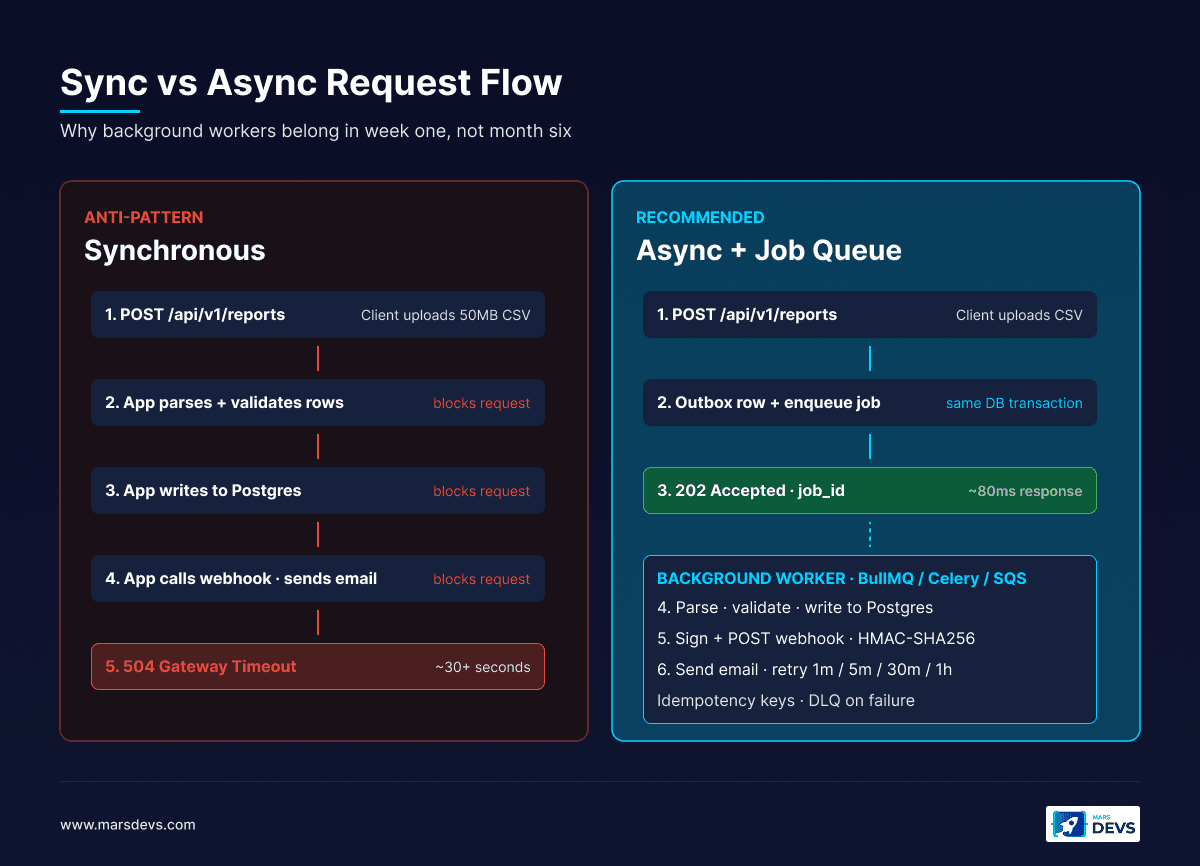
We default to BullMQ + Redis on Node.js stacks because the visibility into queue health is excellent and the operational footprint is small. For Python AI builds, Celery + Redis is the same pattern. For deep AWS-native deployments, SQS plus Lambda consumers is the lowest-ops option.
Architecture that works at 100 users will break at 10,000. The question is not if you need to scale, but when. The patterns you choose early decide how painful (or painless) that scaling path becomes.
Vertical scaling means adding more CPU, memory, or storage to your existing servers. The simplest approach. Most managed services let you scale vertically with a button click.
Horizontal scaling means adding more server instances and distributing load across them. It requires a load balancer, stateless application design, and centralized session storage in Redis.
| Scaling type | Pros | Cons | Good until |
|---|---|---|---|
| Vertical | Simple. No code changes. | Hardware limits. Single point of failure. | ~5,000 concurrent users |
| Horizontal | Near-unlimited scale. Fault tolerance. | Requires stateless design and session management. | Millions of users |
The practical path: scale vertically until you cannot. Most SaaS products handle 1,000 to 5,000 concurrent users on a single well-provisioned server. When response times degrade or CPU consistently exceeds 70%, add horizontal scaling. Do not pre-empt it. Adding horizontal capacity before you have measured the bottleneck adds operational complexity that slows feature development.
Noisy neighbor is the canonical failure mode of a multi-tenant pool. One tenant runs a heavy export, an N+1-laden cron job, or an unbounded report query, and every other tenant on the shared database sees latency spike. The mitigations are well-known and required from day one of any pool-model SaaS that intends to grow.
Six mitigations, in order of cost-to-implement:
statement_timeout per role or per request. A runaway query hits the timeout, gets killed, and stops eating shared resources. Default: 30 seconds for user-facing queries, 5 minutes for explicit background jobs.tenant_id. You cannot fix noisy neighbor without first knowing which tenant is the noisy one. Add it on day one. Adding it later is painful.tenant_id once one tenant is more than 10% of total load. Reversible if the schema stays compatible.The metric to track is not "average query latency". It is "p95 query latency segmented by tenant_id". A pool-model SaaS where most tenants see 200ms p95 and one tenant sees 4s p95 has one noisy neighbor and a fixable problem. A pool-model SaaS where every tenant's p95 has been creeping up for three months needs sharding.
Here is the progression we follow for most SaaS products. Do not skip stages. Do not pre-empt them.
0 to 500 users (MVP phase):
500 to 5,000 users (Growth phase):
5,000 to 50,000 users (Scale phase):
50,000+ users (Platform phase):
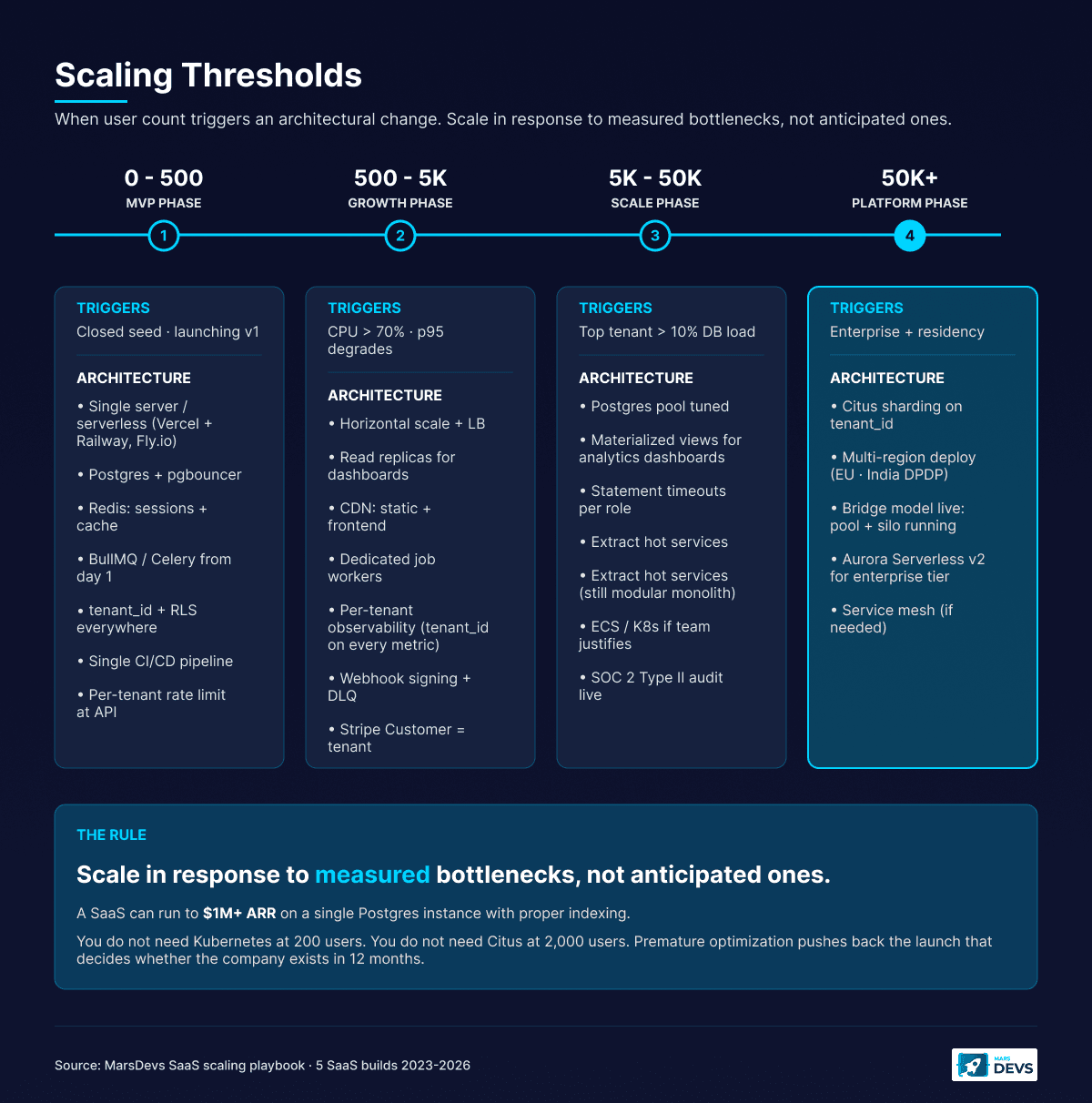
The key insight: you do not need Kubernetes at 200 users. You do not need database sharding at 2,000 users. Scale in response to measured bottlenecks, not anticipated ones. Every premature optimization adds complexity that slows feature development and pushes back the launch date that actually decides whether the company exists in 12 months.
For a deeper comparison of monolith vs microservices and when to extract services, see our microservices vs monolith guide.
Compliance is an architecture decision, not a checklist you bolt on at the end. The earlier you bake the controls in, the cheaper the audit. We have built SaaS that hit SOC 2 Type II in nine months and SaaS that scrambled to retrofit it in two. The first one cost less than half.
The architecture-level controls that show up in every audit:
Multi-tenant Postgres with RLS, AES-256 encryption at rest, TLS 1.2+ in transit, audit logging, and a properly executed Business Associate Agreement is HIPAA-compliant on AWS, Azure, and GCP. The Microsoft governance and compliance guidance for multitenant solutions confirms multi-tenant works across HIPAA, PCI DSS, SOC 2, and ISO 27001, but flags the controls overhead.
What pushes healthcare SaaS to single-tenant is rarely the regulation itself. It is the customer. Enterprise healthcare buyers often want their BAA to apply to a named, dedicated environment. We saw this on a recent SaaS build where the customer's compliance team raised audit-logging requirements in week 7 and the data plane needed to be physically isolated for PHI. That was procurement preference, not HIPAA mandate. Procurement always wins.
Above 6 million card transactions per year, PCI Level 1 is the regime. The audit becomes structurally easier with siloed environments because PCI scope shrinks. The pattern most fintech founders run: ship a multi-tenant base product and silo the PCI scope (the actual card-data path) into its own segment, often using Stripe Connect or a tokenization vault to keep PAN data out of your environment entirely. Done right, you can hold PCI scope to a few services instead of your whole SaaS.
For most B2B SaaS, SOC 2 Type II is the audit your enterprise customers will ask for first. Architectural prerequisites: audit logging, least-privilege IAM, MFA, encryption at rest and in transit, change management with code review and CI gates, vendor risk register, incident response runbook. These should already be in your build. The audit just verifies what you have done.
The whole point: every one of these controls is cheaper to build in week one than to retrofit in month nine. We have done both. Build it in.
For tech stack choices that pair with this architecture, see our best tech stack for startups in 2026 guide.
A monolithic application with multi-tenant Postgres (Row-Level Security on tenant_id), API-first contracts, a managed auth provider (Clerk, Auth0, or WorkOS), and a background job queue. This stack supports growth to 5,000 concurrent users without a rewrite. Extract services only when team size or traffic forces it.
Multi-tenant is the right default for 90% of SaaS startups. Infrastructure costs stay flat as you add customers, and one codebase plus one database keeps operations simple. Multi-tenant lowers total cost of ownership by roughly 40% versus silo. Choose single-tenant only for HIPAA BAA, PCI Level 1, or sovereign residency.
Postgres 16 is the best default for 95% of SaaS. It handles relational data, JSONB, Row-Level Security for multi-tenancy, full-text search, and pgvector for AI features in one engine. Use Supabase, Neon, AWS RDS, or Aurora Serverless v2 so backups and replication are managed.
Refactor when you have measured a bottleneck, not when you anticipate one. Triggers: query times consistently above 500ms, job queues backing up, deploys slowing because too many teams touch the same codebase, or a compliance regime (HIPAA, PCI, residency) that forces it. Otherwise, ship features.
Use a managed provider (Clerk, Auth0, or WorkOS) for identity and build tenant-scoped authorization yourself. Every JWT carries a tenant_id claim. Middleware extracts the tenant on every request, RBAC checks the user's role inside that tenant, and RLS scopes queries automatically. Use 15-minute access tokens with refresh rotation.
A standard SaaS platform costs $10,000 to $50,000 to build with MarsDevs. Complex enterprise builds with HIPAA or PCI scope land between $30,000 and $200,000. Engineer rates are $15 to $25/hr. Timeline is typically 6 to 16 weeks for v1. See our cost to build SaaS guide.
Stay on a modular monolith until organizational complexity forces the split. The trigger is usually team size (more than 25 engineers shipping to the same codebase) or one service having fundamentally different scale or latency requirements. Most startups never need microservices. See our microservices vs monolith guide.
No, not for the first 5,000 users. Vercel + Railway, Fly.io, or AWS App Runner cover most SaaS workloads through scale-up. Adopt Kubernetes when you have multiple services that need orchestration, multi-region deployment, or a platform team that wants the abstraction. On day one it is a tax most early SaaS pays for two years.
The architecture decisions you make in your first two weeks decide the next two years of your product's life. Get tenancy right, design APIs before UI, pick a managed auth provider over custom code, build async processing from day one, and bake compliance controls in instead of bolting them on. These patterns cost days to implement upfront and save months of painful refactoring later.
Every SaaS we ship at MarsDevs follows these patterns. We have learned them by building 80+ products across 12 countries since 2019, including SaaS platforms across B2B analytics, fintech, healthcare, marketplace, and internal-ops. Four of our last five SaaS builds ran on a pooled Postgres model with tenant_id plus RLS from day one. The fifth was siloed end to end for healthcare PHI compliance. That is the spread.
Want to skip the trial-and-error phase? MarsDevs provides senior engineering teams that start building in 48 hours. We take on 4 new SaaS projects per month, every project ships with production-ready architecture, tenant isolation, and full code ownership from day one. SaaS platform builds typically run $10,000 to $50,000. Complex builds with HIPAA, PCI, or sovereign residency land at $30,000 to $200,000. Engineer rates are $15 to $25/hr.
Talk to our engineering team about your SaaS architecture before you write the first line of code. We can help you avoid 6 to 12 months of mistakes.

Co-Founder, MarsDevs
Vishvajit started MarsDevs in 2019 to help founders turn ideas into production-grade software. With deep expertise in AI, cloud architecture, and product engineering, he has led the delivery of 80+ software products for clients in 12+ countries.
Get more guides like this
Join founders, CTOs, and engineering leaders who receive our engineering insights weekly. No spam, just actionable technical content.
Partner with our team to design, build, and scale your next product.
Let’s Talk