TL;DR
TL;DR: AI agents for customer service resolve 60 to 80% of tier1 tickets autonomously at $0.25 to $0.50 per interaction versus $3.00 to $6.00 for a human, and s
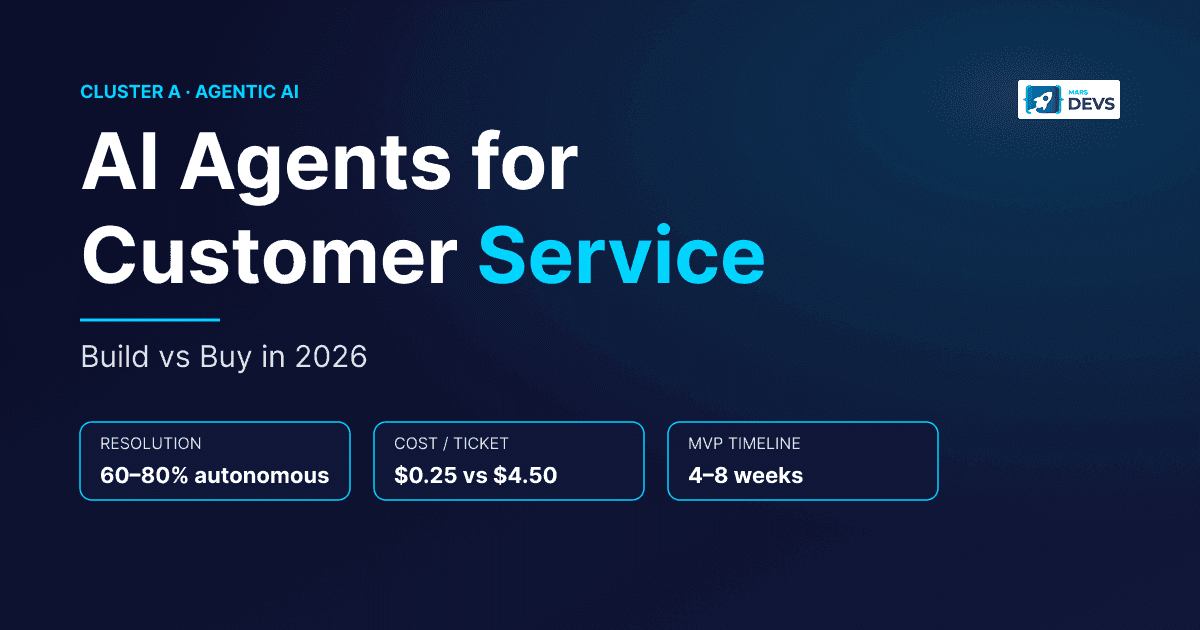
TL;DR: AI agents for customer service resolve 60 to 80% of tier-1 tickets autonomously at $0.25 to $0.50 per interaction versus $3.00 to $6.00 for a human, and ship as an MVP in 4 to 8 weeks. The dominant 2026 platforms are Zendesk AI, Intercom Fin ($0.99 per resolved conversation), Decagon, Sierra, Ada, and Salesforce Agentforce. Custom builds run $5K to $30K (MVP) or $30K to $80K (production). We have shipped 6 customer service agent systems at MarsDevs across Zendesk, Intercom, and Salesforce stacks. The hard part is never the LLM. It is the integration layer.
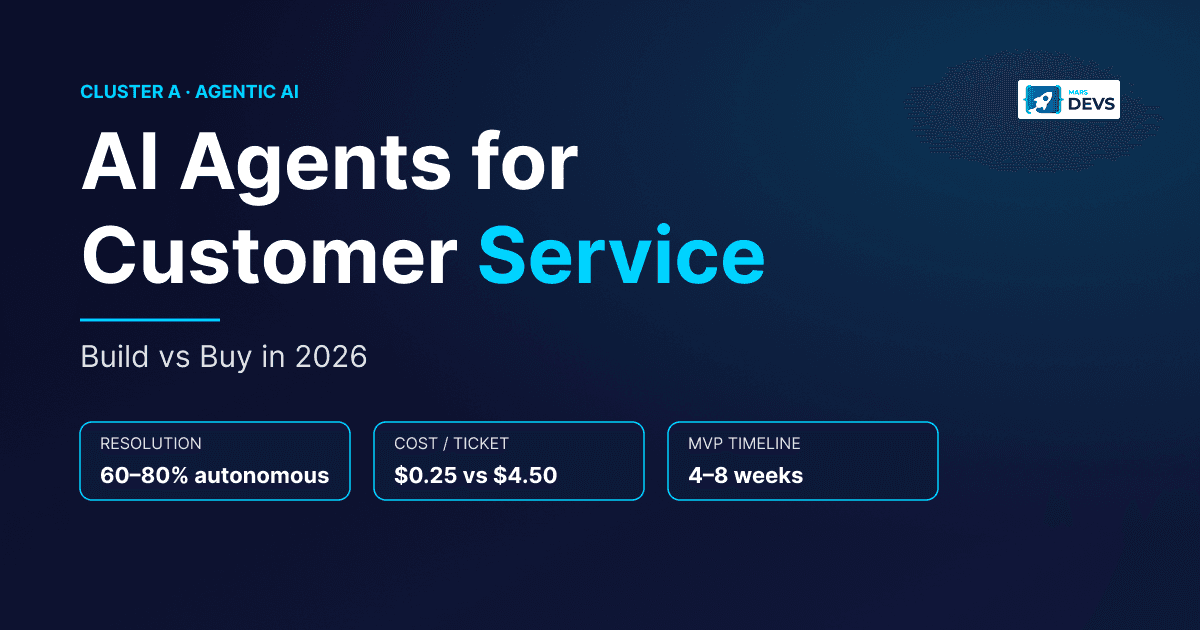
AI customer service agents are autonomous LLM-driven systems that classify intent, pull customer history from a CRM, generate grounded responses, and escalate edge cases to humans. Modern intent classifiers hit 95%+ accuracy on well-defined categories, and production agents typically resolve 60 to 80% of first-line queries without a human in the loop. Unlike a scripted chatbot, an agent reasons about context, calls tools, and maintains conversation memory across channels.
Your support team answers the same 15 questions 400 times a week. Password resets. Order status. Refund requests. Shipping updates. Your senior agents are stuck on tier-1 work, your tickets pile up, and your customers wait 4 hours during peak volume.
MarsDevs is a product engineering company that builds AI-powered applications, SaaS platforms, and MVPs for startup founders. We have shipped customer service agent systems that connect to Zendesk, Intercom, Salesforce Service Cloud, Stripe, and custom OMS platforms across e-commerce, fintech, and B2B SaaS. The gap between a demo that wins your board meeting and an agent that handles 10,000 tickets a week sits entirely in the integration layer. That is where we operate. For the broader category context, see our pillar what are AI agents and the related explainer what is agentic AI.
Here is what a production customer service AI agent handles in 2026:
What AI agents still cannot do well: emotionally charged complaints that need genuine empathy, novel situations with no precedent in your data, and judgment calls that require company-level discretion (like waiving a policy for a strategic customer). The job of a good agent is to take the volume so your humans can take the hard ones.
Every production customer service AI agent runs on the same five-layer architecture: input, reasoning, memory, action, safety. Whether you build it on OpenAI Assistants API, Anthropic Claude with LangGraph, or buy it as Ada or Sierra, these layers exist. Knowing them helps you scope a build, evaluate a vendor, and debug when tickets start falling through the cracks.
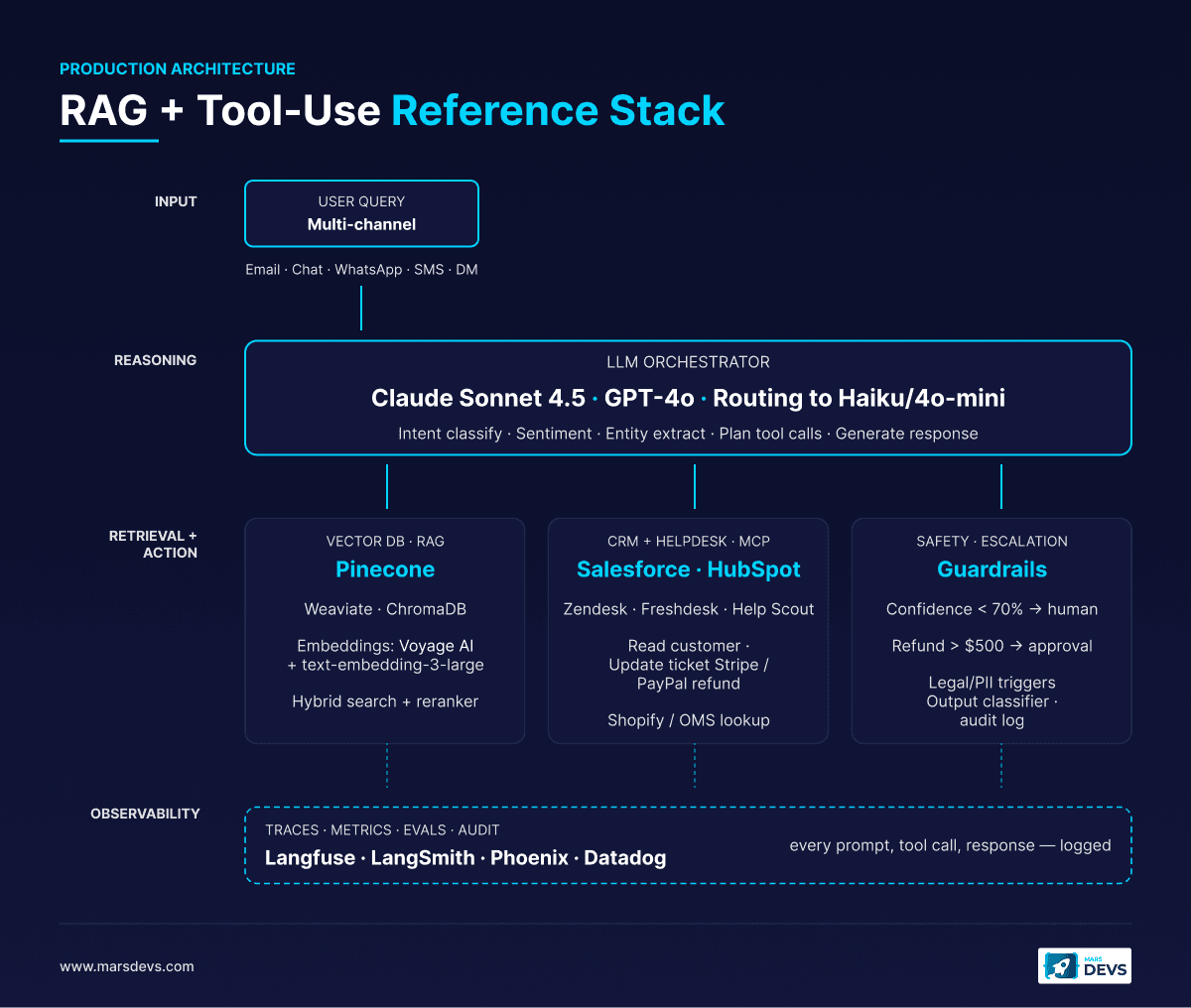
The input layer normalizes messages from every channel (email, live chat, WhatsApp, SMS, Instagram DM, in-app widget) into a single internal format the agent can process. Customers do not care about your architecture. They message on whatever channel is open.
This is where most "AI chatbot" implementations fail. They support web chat well, treat email as a separate world, and ignore social entirely. A production agent needs a unified message bus that holds conversation context even when a customer starts on chat and follows up by email three days later. We have rebuilt this layer for two clients who originally bought a single-channel tool and outgrew it within 90 days.
The reasoning layer is the core of the agent. It runs three operations on every inbound message: intent classification, sentiment analysis, and entity extraction. Transformer-based classifiers reach 95%+ accuracy on well-defined categories.
The LLM then plans a resolution path. For a clean request ("Where is order #12345?"), it calls the order lookup tool. For an ambiguous request, it asks one clarifying question. For multi-step workflows, it plans a sequence of tool calls and executes them with backoff and retry logic.
Memory is what separates an agent from a chatbot. Your agent needs two kinds: conversation memory for the current interaction and customer memory for historical context. A VIP with $50,000 annual spend gets different handling than a free-tier user, and the agent has to know.
Conversation memory tracks the current interaction: what has been discussed, which tools were called, what the customer's emotional state is right now. This kills the worst part of legacy support: making a customer repeat themselves.
Customer memory pulls historical context: past tickets, purchase history, subscription tier, previous escalations, lifetime value, preferences. For customer memory you integrate with your CRM and data warehouse. For conversation memory, frameworks like LangGraph and OpenAI Assistants API give you session state out of the box, with optional persistence to Postgres or a vector DB like Pinecone or Weaviate. For a deeper framework comparison, see LangGraph vs CrewAI vs AutoGen.
This is where the agent does work, not just talk. Each "tool" is a connection to an external system, and tool count is the single biggest cost driver.
| Tool | System | What It Does |
|---|---|---|
| Order lookup | OMS / Shopify / custom | Fetches order status, tracking info, delivery estimates |
| Refund processor | Stripe / PayPal / billing | Initiates refunds based on eligibility rules |
| Account manager | CRM / user database | Updates contact info, subscription changes, password resets |
| Knowledge retriever | Vector DB + docs | Searches help center and product docs via RAG |
| Ticket creator | Helpdesk system | Creates, updates, and closes tickets in Zendesk, Freshdesk, Help Scout |
| Escalation handler | Routing engine | Transfers to human agent with full context |
Each tool integration takes 1 to 2 weeks of development and testing. Tool count is the single biggest driver of AI agent development cost. Six tools is roughly twice the budget of three, not 50% more.
Your agent will encounter situations it should not handle on its own. The safety layer defines escalation triggers, response guardrails, and human-in-the-loop checkpoints. Skip this layer and your agent is a liability.
Build it well and you get 60 to 80% autonomous resolution with a clean handoff for the rest.
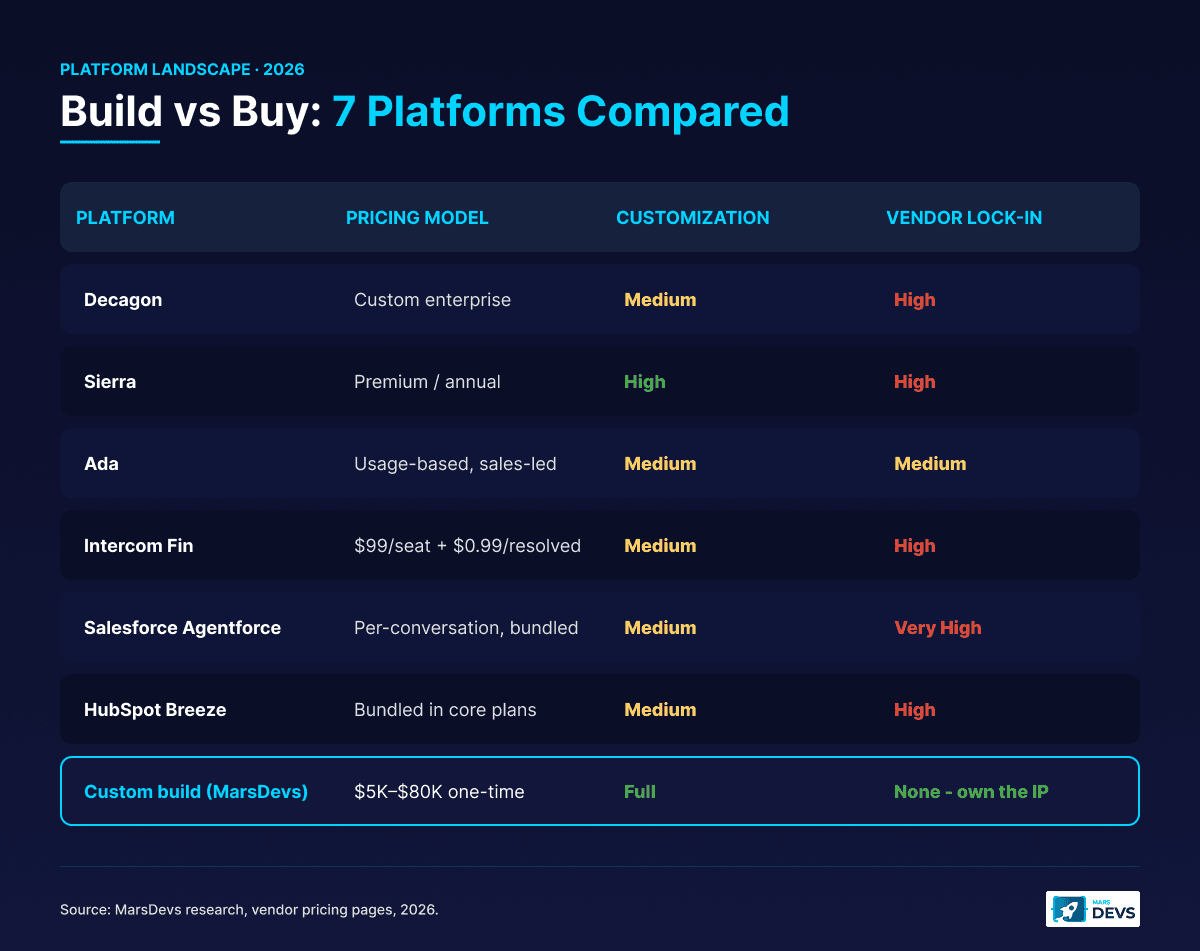
The honest answer depends on your ticket volume, your stack, and how differentiated your support workflow needs to be. Below 5,000 monthly tickets, SaaS platforms win on speed-to-live. Above 10,000, custom builds pay back inside 12 months on per-ticket economics alone.
Off-the-shelf AI customer support platforms get you a working agent in days or weeks. The trade-offs hit at scale: per-resolution pricing, limited customization, and lock-in to whatever the platform supports natively. Implementation services typically run $50,000 to $200,000 for a full enterprise rollout, and full operational ramp takes 3 to 6 months.
| Platform | Pricing Model | Best For | Limitations |
|---|---|---|---|
| Zendesk AI (Resolution Bot, Advanced AI) | $149/agent/month + Suite subscription | Enterprise teams already on Zendesk | Functions more as agent assist than autonomous resolver |
| Intercom Fin | $99/seat/month + $0.99 per resolved conversation | Mid-market teams already on Intercom | Per-resolution pricing gets painful above 10K monthly tickets |
| Ada | Custom usage-based | High-volume retail and travel | No public pricing, sales-led, longer onboarding |
| Forethought | Custom enterprise pricing | Mid-market to enterprise CX teams | Heavy services component for full deployment |
| Decagon | Custom enterprise pricing | High-volume B2C support | Newer entrant, smaller integration ecosystem |
| Sierra | Custom enterprise pricing | Brand-led companies wanting custom voice | Premium tier, requires committed annual spend |
| Crescendo | CX-as-a-service blended pricing | Teams that want AI plus human ops together | Pricing wraps human labor, harder to compare |
| Freshdesk Freddy | Included in higher Freshdesk tiers | Budget-conscious SMBs | Less sophisticated reasoning than standalone AI platforms |
| Salesforce Agentforce | Per-conversation, bundled with Service Cloud | Salesforce-native CX teams | Tight to Salesforce, premium pricing |
Building gives you full control over architecture, integrations, and customer experience. You also own the IP, which matters if your support flow is part of your differentiation.
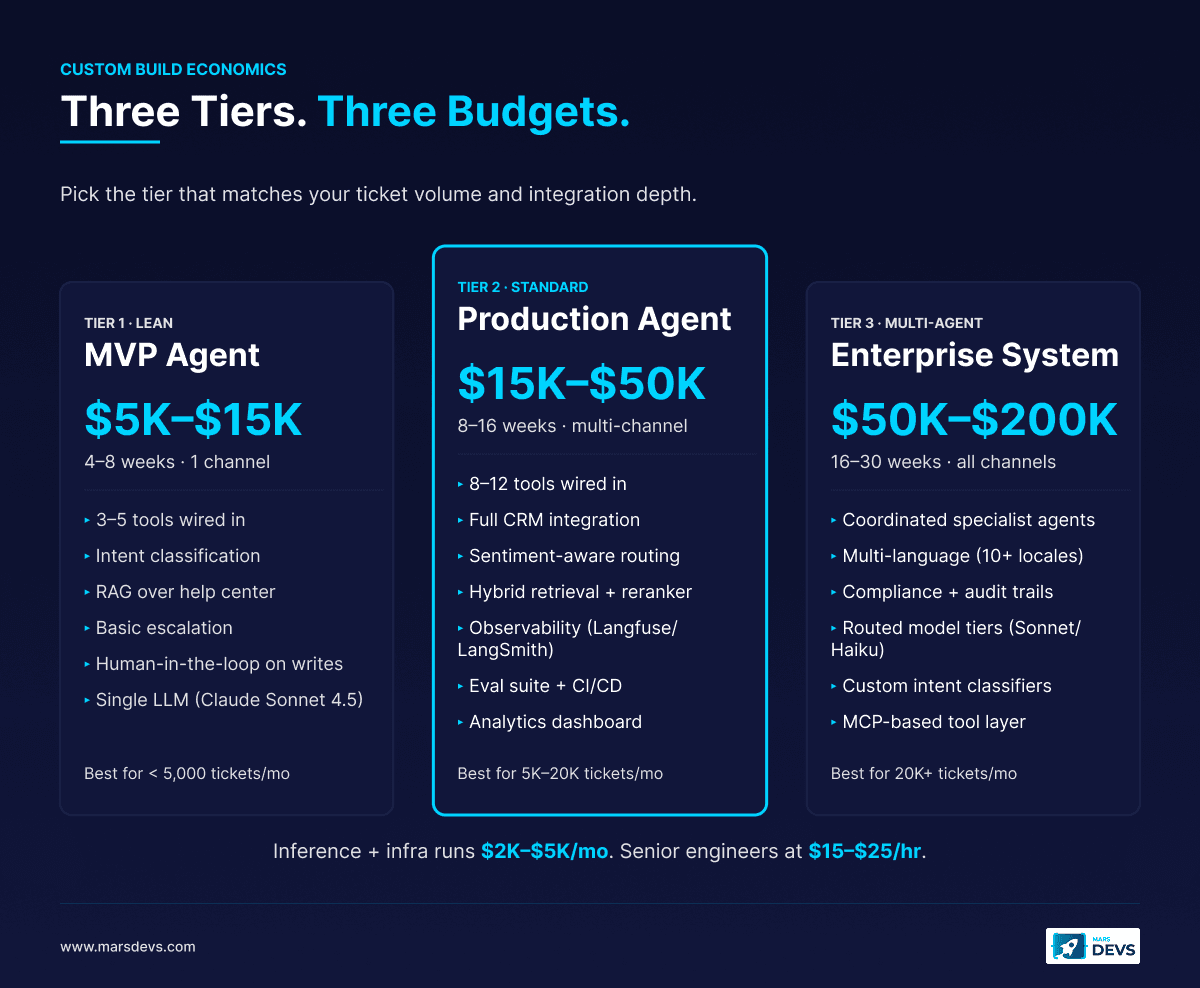
| Agent Tier | Cost Range | Timeline | What You Get |
|---|---|---|---|
| MVP (single channel, 3 to 5 tools) | $5,000 to $30,000 | 4 to 8 weeks | Intent classification, FAQ resolution via RAG, simple escalation |
| Production (multi-channel, 8 to 12 tools) | $30,000 to $80,000 | 8 to 16 weeks | Full CRM integration, sentiment-aware routing, analytics dashboard |
| Multi-agent (advanced logic, multiple coordinated agents) | $5,000 to $30,000 per agent, scaling with system | 16 to 30 weeks | Multi-language, custom routing logic, compliance workflows, audit trails |
MarsDevs provides senior engineering teams for founders and CX leaders who need to ship fast without compromising quality. At $15 to $25 per hour for senior engineers, building custom often lands at less than one year of SaaS licensing. You ship to production in 6 to 12 weeks and you keep 100% of the code.
We have built 6 customer service agents in production over the past 18 months. Every one used the same five-layer architecture above. The differences were in tool selection, integration depth, and how aggressively each team wanted to remove human-in-the-loop steps over time.
Buy if: you handle fewer than 5,000 tickets per month, your workflows are standard (basic e-commerce, vanilla SaaS support), and you need something live within 2 weeks. Per-ticket economics favor SaaS at lower volumes.
Build if: you handle more than 10,000 tickets per month, you need deep integration with proprietary systems, your support workflow is part of your differentiation, or you want to own the IP. Above that volume, the per-ticket cost of a custom agent drops below SaaS licensing within 6 to 12 months.
Hybrid if: you want immediate coverage and long-term ownership. Start on Intercom Fin or Ada for tier-1 deflection, then build custom agents for your highest-volume or most complex categories. Migrate the volume incrementally as the custom agent proves out.
A customer service AI agent that cannot reach your business data is a fancy FAQ bot. Integration is where the real value sits, and where the engineering work is. Tool integrations average 1 to 2 weeks each and dominate the build budget.
Your agent needs read and write access to your CRM to personalize responses and update records.
Salesforce Service Cloud offers Agentforce with the Atlas Reasoning Engine, its native AI agent framework. If you are already on Salesforce, Agentforce gives you pre-built connectors and tight Service Cloud integration (Salesforce Agentforce docs). For custom agents that need to coexist, Salesforce exposes REST and GraphQL APIs plus MuleSoft for middleware.
HubSpot ships Breeze AI agents in core plans with no separate AI add-on cost in 2026. Breeze handles customer-facing support natively. For custom agents, HubSpot's API is well-documented and increasingly MCP-compatible for standardized tool connections.
For Zendesk, Freshdesk, Help Scout, and custom CRMs, you build API connectors that let your agent query customer records, update ticket status, log interactions, and trigger workflows. The Model Context Protocol (MCP) is reshaping this. We have cut integration time on supported systems from two weeks to under three days using MCP servers.
Your agent resolves the majority of questions by searching your existing documentation. That requires a working RAG pipeline with four stages: ingest, embed, retrieve, generate.
The detail that bites teams: your knowledge base has to stay current. Stale docs produce confidently wrong answers, and confidently wrong answers destroy customer trust faster than slow ones. Build an automated sync pipeline that re-indexes whenever a doc changes. We tie ours to the docs CMS via webhook.
Your agent needs to create, update, and close tickets in your existing helpdesk: Zendesk, Freshdesk, Help Scout, Jira Service Management, or a custom system. That includes:
This is the integration most teams underestimate. Tickets are the system of record. If your agent's actions do not flow back into the helpdesk, your reporting, your QA, and your audits all break.
For e-commerce and SaaS support, your agent needs access to Stripe, PayPal, Shopify, or your custom billing system. It checks order status, processes refunds, updates subscriptions, and applies credits. Each integration needs careful permission scoping. The agent should read most things and write only inside defined limits, with a hard cap on financial actions above a configured threshold.
We use a tool-call wrapper that logs every write action, the agent's reasoning trace, and the human approval (if any) into a separate audit table. When something goes wrong six weeks later, you need that trail. Without it, you are guessing.
For customer service, we default to Anthropic Claude Sonnet for the reasoning layer because of its grounded response quality, with OpenAI GPT-4o as the fallback for cost-sensitive paths. Routing and intent classification go to smaller models (GPT-4o-mini, Claude Haiku, or fine-tuned classifiers) which are 5 to 10x cheaper and accurate enough at the classification step. For a deeper comparison see OpenAI vs Anthropic vs Google LLM.
The model is the cheapest part of the build, but the prompt is where most agents fail in production. Two failure modes dominate: hallucination (making up policies that do not exist) and over-deflection (refusing to help when the agent could resolve).
The system prompt for a production customer service agent typically runs 1,500 to 3,000 tokens and includes:
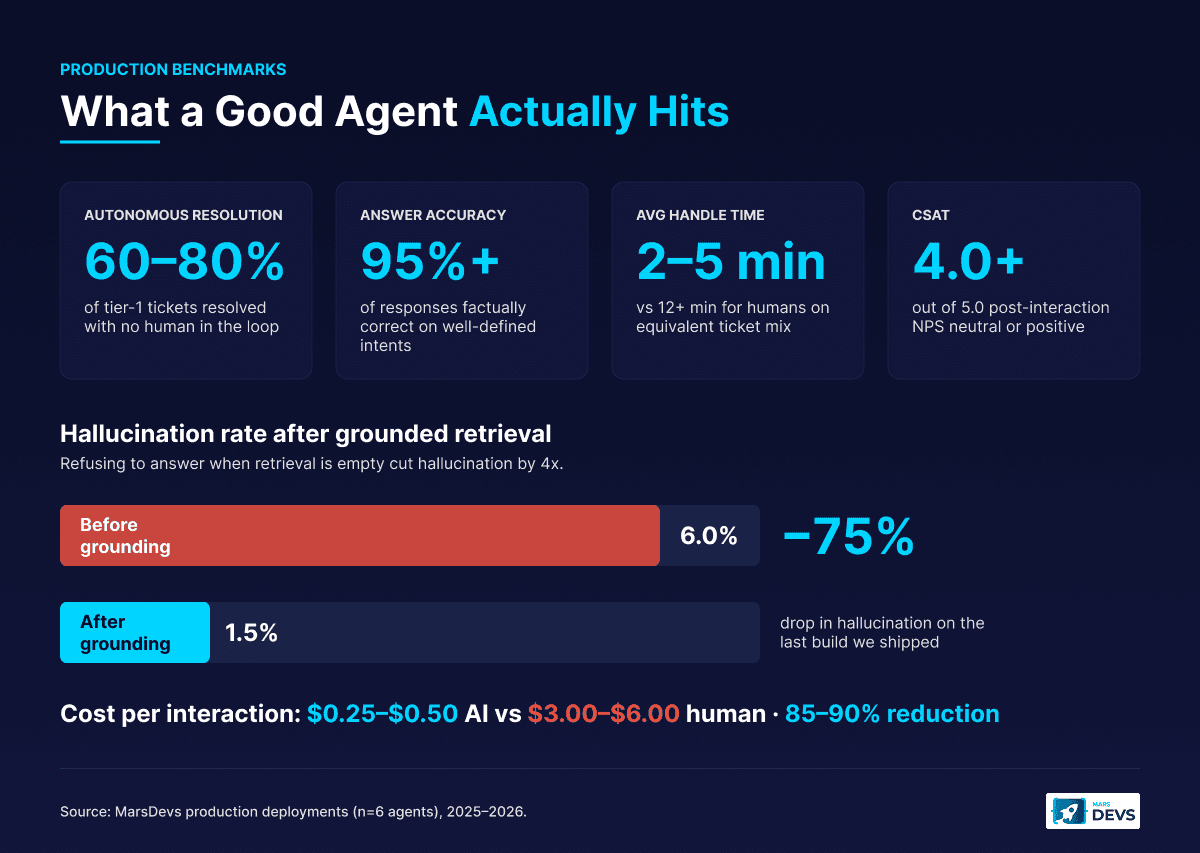
The biggest unlock we have seen is grounding every response in retrieved documentation and refusing to answer if the retrieval is empty. That single rule cut hallucination from 6% to under 1.5% on the last build we shipped.
You will not catch problems by reading transcripts. By the time you read a bad transcript, the customer has already churned. You catch problems with structured observability from day one, logging traces, metrics, evals, and an audit table on every interaction.
Every customer service agent we ship logs four things on every interaction:
This is not optional infrastructure. It is the difference between an agent that quietly drifts in production and one you can actually trust. We have walked into two clients who deployed agents without observability and could not explain why their CSAT dropped 0.4 points in a quarter. With proper traces, that takes 30 minutes to diagnose.
After building 6 customer service agents, the same five mistakes show up on almost every project. Each one shows up in the first 30 days of production if you have not designed for it.
Treating every channel the same. Email lets the agent take 30 seconds to think. Live chat does not. Build channel-specific timeouts and response patterns instead of forcing a single behavior across everything.
Skipping the eval suite. "We will add tests later" turns into "we cannot ship the new model because we do not know if it broke anything." Build a 100-ticket eval set in week 1 and grow it from there.
Giving the agent too much write access too early. The first 60 days, every refund, account change, and irreversible action goes through human approval. Pull the gates one category at a time after you have 200+ correct outcomes. Not before.
Using a single LLM for everything. Routing, classification, response drafting, and final response can all use different models. Sending every step to GPT-4o or Claude Sonnet is expensive and unnecessary.
Letting the knowledge base rot. Stale docs are the number one cause of bad answers. Set up automatic re-indexing on doc updates and a quarterly content audit. The agent's accuracy is a direct function of the knowledge base's accuracy.
Production-grade customer service agents target 60 to 80% autonomous resolution, 95%+ answer accuracy, under 2% hallucination, and AHT of 2 to 5 minutes versus 12+ minutes for humans. Below are the benchmarks we hit on production builds.
| Metric | What It Measures | Good Benchmark |
|---|---|---|
| Autonomous resolution rate | % of tickets resolved without human involvement | 60 to 80% on first-line support |
| First-contact resolution | % resolved on the first interaction | 70 to 85% |
| Escalation rate | % of tickets handed to humans | 20 to 40%, lower is better |
| Containment rate | % of conversations that stay inside the agent | 75 to 90% |
| Deflection rate | % of inbound tickets diverted from queue | 50 to 70% in the first 90 days |
| Metric | What It Measures | Good Benchmark |
|---|---|---|
| CSAT | Post-interaction customer satisfaction score | 4.0+ out of 5.0 |
| NPS impact | Change in NPS for customers who hit the agent | Neutral or positive vs human-only baseline |
| Answer accuracy | % of responses that are factually correct | 95%+ |
| Hallucination rate | % of responses with fabricated information | Under 2% |
| Sentiment delta | Change in customer sentiment from start to end of conversation | Positive shift in 60%+ of interactions |
| Metric | What It Measures | Good Benchmark |
|---|---|---|
| AHT (average handle time) | Time from first message to resolution | 2 to 5 minutes vs 12+ minutes for humans |
| Cost per interaction | Inference, infrastructure, tooling combined | $0.25 to $0.50 vs $3.00 to $6.00 for human |
| Agent utilization | How much of your humans' time is spent on complex work vs repetitive queries | 70%+ on complex work |
| Time to first response | How quickly the agent replies | Under 5 seconds for chat, under 30 minutes for email |
Companies deploying AI agents for customer service report an average return of $3.50 for every $1 invested, with leading organizations reaching 8x ROI (All About AI customer service stats). Average annual savings from AI-driven ticket automation reach $127,000 for mid-market companies, and the AI customer service market hit $15.12 billion in 2026 (Ringly.io 2026 stats).
Here is the math we walk through with founders, for a company handling 20,000 tickets per month.
These are not theoretical. This is the math we walk through every time a CX leader asks whether AI customer support is worth the investment. At above 5,000 monthly tickets, the answer is almost always yes (McKinsey: The state of AI in 2024).
Here is the sequence we run on every customer service agent project: audit (weeks 1-2), MVP build (weeks 3-4), test and expand (weeks 5-8), then optimize and scale from month 3. Most teams hit a stable autonomous resolution rate around month 4 or 5.
Week 1 to 2: Audit and scope. Pull your last 90 days of support tickets out of Zendesk or your helpdesk. Identify the top 10 ticket categories by volume. Calculate what percentage could be resolved with access to your existing data (order status, account info, FAQs). That number is your automation ceiling. We have seen it as low as 35% and as high as 82%, depending on how clean the data and docs are.
Week 3 to 4: Build the MVP. Start with your three highest-volume, lowest-complexity categories. Connect the agent to your knowledge base and one transactional system (usually OMS or CRM). Deploy on a single channel with a human-in-the-loop approval step on every action. The point of week 3 to 4 is not autonomy. It is correctness.
Week 5 to 8: Test, expand, remove gates. Pull the human-in-the-loop on categories where accuracy exceeds 95% across at least 200 tickets. Add 2 to 3 more tool integrations. Enable a second channel. Start measuring the metrics above against pre-launch baselines.
Month 3 and beyond: Optimize and scale. Add remaining channels. Build custom intent classifiers tuned to your taxonomy. Layer in advanced features (sentiment-aware response tone, proactive outreach, multi-language). Continue removing human checkpoints as confidence holds. Most teams hit a stable autonomous resolution rate around month 4 or 5.
Founded in 2019, MarsDevs has shipped 80+ products across 12 countries for startups and scale-ups. If you want to skip the 3 to 6 months of trial and error, talk to our AI engineering team and we will scope a customer service agent for your exact stack and support workflows.
A custom AI customer service agent MVP costs $5,000 to $30,000 and ships in 4 to 8 weeks. Production agents with full CRM integration and multi-channel support run $30,000 to $80,000. SaaS platforms (Zendesk AI, Intercom Fin) charge $99 to $149/seat plus $0.99 per resolved conversation. See AI agent development cost for the full breakdown.
No. AI agents resolve 60 to 80% of routine tickets autonomously: order inquiries, FAQ questions, password resets, simple refunds. The remaining 20 to 40% needs humans for emotionally sensitive situations, edge cases, and policy exceptions. The goal is reallocation, not replacement: humans on the hard work, agents on the volume.
Most CRMs expose REST or GraphQL APIs your agent connects to. Salesforce offers Agentforce and MuleSoft. HubSpot ships Breeze AI with built-in CRM access. For Zendesk, Freshdesk, Help Scout, or custom CRMs, you build API connectors (1 to 2 weeks each). MCP cuts that integration time on supported systems to under 3 days.
Companies report an average $3.50 return for every $1 invested, with top performers at 8x ROI. Per-interaction cost drops from $3.00 to $6.00 down to $0.25 to $0.50, an 85 to 90% reduction. For 20,000 tickets per month, a blended AI-plus-human model saves around $58,000 per month. Most builds pay back in 2 to 3 months.
Build a layered escalation system with explicit triggers: legal threats, sensitive data requests, customers contacting 3+ times, VIPs, and any case where agent confidence drops below 70%. When escalating, pass the full transcript, customer history, sentiment trajectory, and recommended resolution. Without that context transfer, the customer repeats themselves.
You do not train an LLM from scratch. Modern agents use pre-trained models (GPT-4o, Claude Sonnet, Gemini) plus your business data via RAG. You need: help center articles, FAQ content, at least 1,000 historical resolved tickets, product documentation, and access to transactional systems. Cleaner knowledge base equals better day-one performance.
An MVP covering your top 3 to 5 ticket categories on a single channel ships in 4 to 8 weeks for a custom build. SaaS platforms configure in 1 to 4 weeks for basic use cases. A fully integrated multi-channel production agent with advanced routing and analytics takes 3 to 6 months. The bottleneck is integration work.
Start with the channel that has your highest ticket volume and lowest resolution complexity. For most companies that is live chat or web widget, because interactions tend to be shorter and more structured. Add email next (usually highest total volume). Expand to SMS, WhatsApp, or social based on where your customers actually reach out.
We default to Anthropic Claude Sonnet for the reasoning layer because of its grounded response quality, with OpenAI GPT-4o as the fallback for cost-sensitive paths. Routing and classification go to smaller models (GPT-4o-mini, Claude Haiku) which are 5 to 10x cheaper. See OpenAI vs Anthropic vs Google LLM.
Ready to build an AI agent that resolves tickets instead of just deflecting them? Book a free strategy call with our AI engineering team and we will scope a customer service agent built for your stack, your data, and your support volume. We take on 4 new projects per month. Claim an engagement slot.

Co-Founder, MarsDevs
Vishvajit started MarsDevs in 2019 to help founders turn ideas into production-grade software. With deep expertise in AI, cloud architecture, and product engineering, he has led the delivery of 80+ software products for clients in 12+ countries.
Get more insights like this
Join founders, CTOs, and engineering leaders who receive our engineering insights weekly. No spam, just actionable technical content.


